



Understanding the JVM: The Heart of Java
Understanding the JVM: The Heart of Java
When people say “Java runs everywhere”, they are actually talking about the Java Virtual Machine (JVM). The JVM is the core technology that allows Java programs to run on different operating systems without modification.
But what exactly is the JVM? How does it work internally? And why is it such a powerful piece of engineering?
Let’s break it down.
What is the JVM?
The Java Virtual Machine (JVM) is a runtime environment that executes Java bytecode.
Instead of compiling Java code directly into machine code for a specific operating system, Java compiles code into an intermediate format called bytecode. This bytecode can then run on any machine that has a JVM installed.
This design leads to Java’s famous philosophy:
Write Once, Run Anywhere.
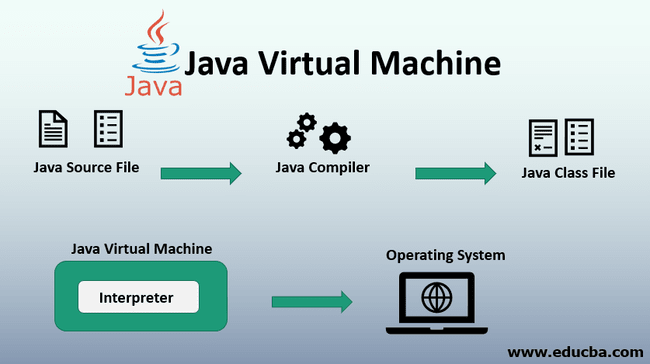
The flow looks like this:
Java Source Code (.java)
        ↓
Java Compiler (javac)
        ↓
Bytecode (.class)
        ↓
Java Virtual Machine (JVM)
        ↓
Machine Code
The JVM interprets or compiles the bytecode into native instructions that the operating system can execute.
JVM vs JRE vs JDK
Many developers confuse these three terms.
JVM
The JVM is responsible for executing Java bytecode.
JRE (Java Runtime Environment)
The JRE contains:
-
JVM
-
Core Java libraries
-
Other runtime components
It allows you to run Java programs but not develop them.
JDK (Java Development Kit)
The JDK contains:
-
JRE
-
Development tools like:
-
javac -
jdb -
jar -
javadoc
-
Developers use the JDK to build Java applications.
Hierarchy:
JDK
 └── JRE
      └── JVM
The JVM Architecture
Internally, the JVM has several components working together.
1. Class Loader
The Class Loader loads compiled .class files into memory.
It follows three main steps:
-
Loading – Reads
.classfiles. -
Linking
-
Verification
-
Preparation
-
Resolution
-
-
Initialization – Executes static variables and blocks.
Java uses a parent delegation model, meaning it checks higher-level class loaders before loading classes itself.
Main types of class loaders:
-
Bootstrap ClassLoader
-
Extension ClassLoader
-
Application ClassLoader
2. Runtime Data Areas
When a Java program runs, the JVM divides memory into several regions.
Method Area
Stores:
-
Class metadata
-
Static variables
-
Runtime constant pool
-
Method code
Heap
The heap is where objects are allocated.
This is also where the Garbage Collector (GC) operates.
Example:
User user = new User();The User object is stored in the heap.
Stack
Each thread has its own stack.
The stack stores:
-
Method calls
-
Local variables
-
Partial results
Example:
main()
  └── login()
        └── validateUser()
Each method creates a stack frame.
Program Counter (PC Register)
Each thread has its own program counter that tracks the current instruction being executed.
Native Method Stack
Handles native code written in languages like C or C++ using JNI.
The Execution Engine
The Execution Engine executes the bytecode.
It consists of two main components.
Interpreter
The interpreter reads bytecode line by line and executes it.
Pros:
-
Fast startup
Cons:
-
Slower execution
JIT Compiler (Just-In-Time Compiler)
The JIT compiler improves performance by compiling frequently used bytecode into native machine code.
Instead of interpreting repeatedly, the compiled native code runs directly.
Benefits:
-
Much faster performance
-
Optimized execution
This is why Java applications often get faster after running for some time.
Ahead-of-Time Compilation (AOT)
Another compilation strategy supported by modern Java ecosystems is Ahead-of-Time (AOT) compilation.
Unlike JIT, which compiles code during runtime, AOT compiles Java bytecode into native machine code before the application starts.
The flow becomes:
Java Source Code (.java)
↓
Java Compiler (javac)
↓
Bytecode (.class)
↓
AOT Compiler
↓
Native Machine Code
↓
Run directly on OS
AOT is particularly useful in environments where startup time and memory usage are critical.
For example:
-
Microservices
-
Serverless applications
-
Containerized workloads
One of the best-known AOT implementations is GraalVM Native Image, which compiles a Java application into a single native executable.
Instead of running:
java -jar my-app.jarYou can run:
./my-appAdvantages of AOT
-
Extremely fast startup time
-
Lower memory usage
-
Smaller runtime environment
Limitations
AOT also introduces some challenges:
-
Reflection and dynamic class loading must be configured explicitly
-
Longer build times
-
Less adaptive optimization compared to JIT
As a result, JIT and AOT are often complementary technologies rather than direct replacements.
Garbage Collection
Java automatically manages memory through Garbage Collection (GC).
Instead of manually freeing memory (like in C or C++), the JVM detects unused objects and removes them.
Example:
User user = new User();
user = null;
If the object is no longer referenced, it becomes eligible for garbage collection.
Common GC algorithms include:
-
Serial GC
-
Parallel GC
-
G1 GC
-
ZGC
-
Shenandoah
Each has different performance characteristics depending on latency and throughput requirements.
Why the JVM is Powerful
The JVM offers several key advantages.
Platform Independence
Java bytecode runs on any system with a JVM.
Automatic Memory Management
Garbage collection prevents memory leaks and simplifies development.
Security
The JVM includes:
-
Bytecode verification
-
Class loader isolation
-
Security manager
Performance Optimizations
Modern JVMs use advanced techniques such as:
-
JIT compilation
-
Escape analysis
-
Adaptive optimization
JVM Languages
The JVM is not limited to Java.
Many languages compile to JVM bytecode, including:
-
Kotlin
-
Scala
-
Groovy
-
Clojure
This makes the JVM one of the most important runtime platforms in modern software development.
